Service Manual — page 414 of 715
Final Drive › Drive Chain Replacement
Text on this page
11-8 FINAL DRIVE
Drive Chain

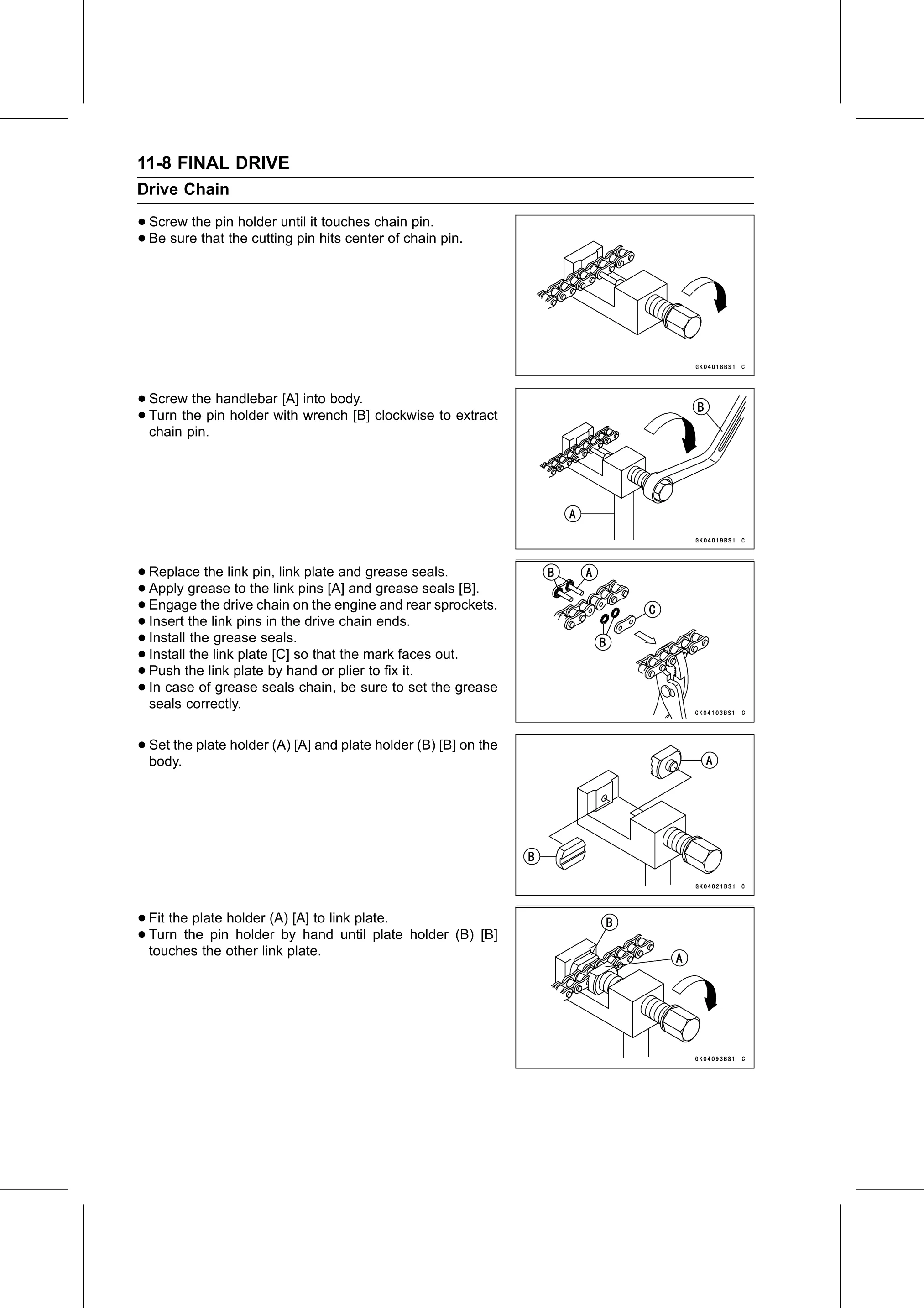
• Screw the pin holder until it touches chain pin.
• Be sure that the cutting pin hits center of chain pin.

• Screw  the handlebar [A] into body.
• chain pin.pin holder with wrench [B] clockwise to extract
  Turn the

• Replace    the link pin, link plate and grease seals.
• Engage the drive
  Apply   grease   to the link pins [A] and grease seals [B].
• Insert the link pinschain   on the engine and rear sprockets.
• Install the grease seals. drive chain ends.
                         in the
• Install the link plate [C] so that the mark faces out.
• Push the link plate by hand or plier to fix it.
• In case of grease seals chain, be sure to set the grease
• seals correctly.

• Set the plate holder (A) [A] and plate holder (B) [B] on the
  body.

• Fit the plate holder (A) [A] to link plate.
• Turn  the pin holder by hand until plate holder (B) [B]
  touches the other link plate.