Service Manual — page 463 of 715
Brakes › How to Erase Service Codes
Text on this page
BRAKES 12-41
Anti-Lock Brake System
How to Read Service Codes
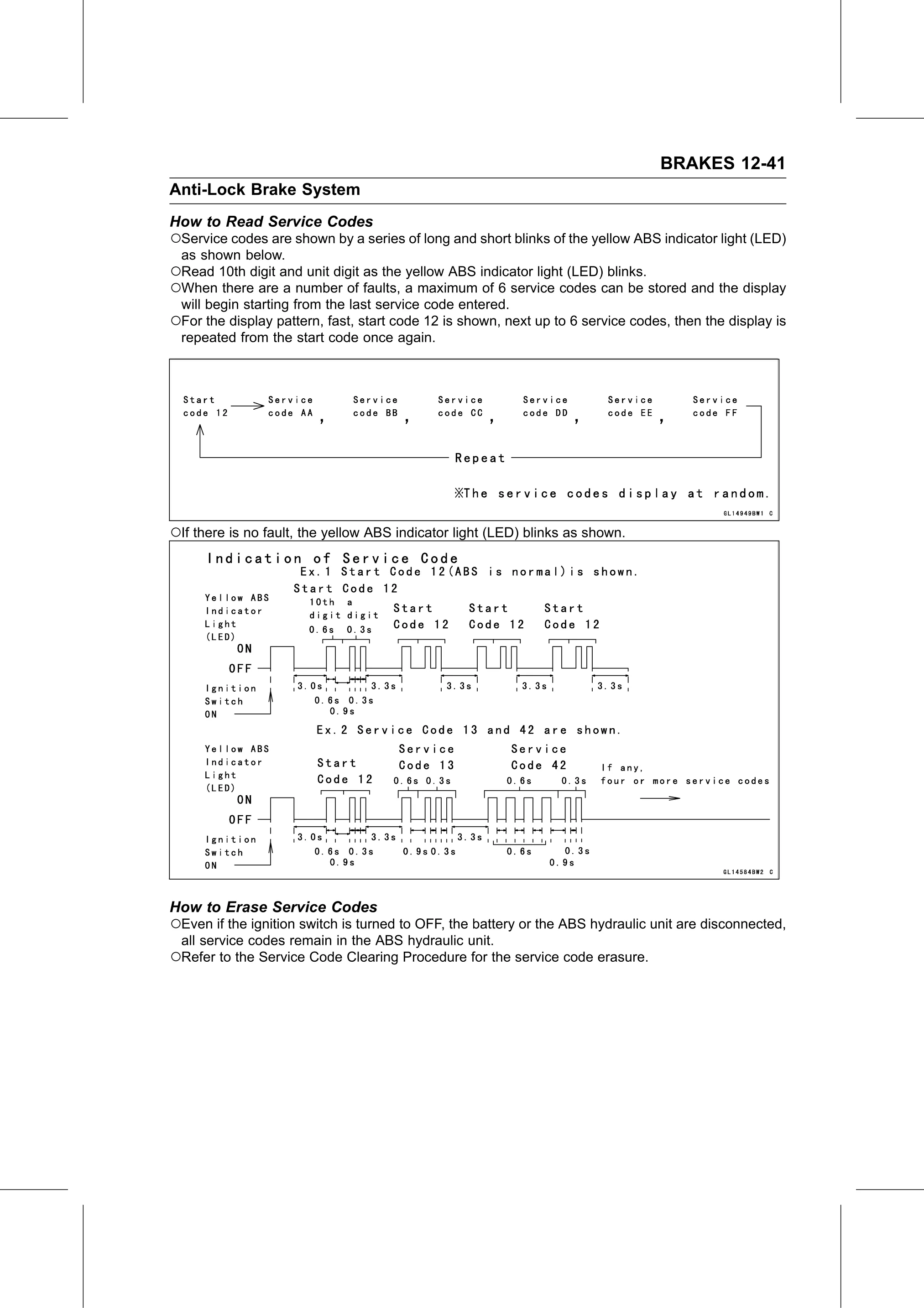
○Service codes are shown by a series of long and short blinks of the yellow ABS indicator light (LED)
 as shown below.
○Read 10th digit and unit digit as the yellow ABS indicator light (LED) blinks.
○When there are a number of faults, a maximum of 6 service codes can be stored and the display
 will begin starting from the last service code entered.
○For the display pattern, fast, start code 12 is shown, next up to 6 service codes, then the display is
 repeated from the start code once again.

○If there is no fault, the yellow ABS indicator light (LED) blinks as shown.

How to Erase Service Codes
○Even if the ignition switch is turned to OFF, the battery or the ABS hydraulic unit are disconnected,
 all service codes remain in the ABS hydraulic unit.
○Refer to the Service Code Clearing Procedure for the service code erasure.